

[Sep-2024] SAP C_THR86_2311 Official Cert Guide PDF
Exam C_THR86_2311: SAP Certified Application Associate - SAP SuccessFactors Compensation 2H/2023 - PrepPDF
NEW QUESTION # 41
Your EC-intagrated client has employees in several countries While all the countries are planned on the same worksheet at the same time there are slight differences in the Effective Dates of the new salaries when they are published back to EC.How can this requirement be met through configuration?
- A. Create a lookup table that contains the different dates that uses country as an input.*Create a custom date column that reads from the lookup table based on employee country*Map the column ID of the custom date column to the 'start-date' of the pay component in the XML
- B. Enter the effective date for the largest country in the Employee Central Settings screen*Publish the results of the planning for all countries*Manually modify the effective dates of the resulting EC data for the smaller countries
- C. On the Employee Central Settings screen in Compensation Home set the Effective Date to be that of the largest country.*Use the Publish Selected Employees in Employee Central to publ<sh the data for this country*Manually modify the effective date to be that of the next country and publish the data for them Repeat for all countries
- D. Create a lookup table that contains the different dates that uses country as an input*Map the lookup table name to the start-date' of the pay component in the XML
Answer: A
NEW QUESTION # 42
Your client would like a specific population of inactive employees to be included in the worksheet.Which combination of settings allows you to achieve this?
- A. Select 'All employees are eligible" under Eligibility Settings, and update eligibly rules to EXCLUDE the desired inactive employees
- B. Select 'Including Inactive Users' when defining the Method of Planner, select 'All employees are eligible" under Eligibility Settings and update eligibility rules to INCLUDE the desired inactive employees.
- C. Select "All employees are eligible' under Eligibility Settings, and update eligibility rules to INCLUDE the desired inactive employees
- D. Select 'Including Inactive Users' when defining the Method of Planner, select 'All employees are eligible" under Eligibility Settings and update eligibility rules to EXCLUDE the undesired inactive employees
Answer: B
NEW QUESTION # 43
Your client wants to pre-populate merit recommendations with the ideal values upon worksheet launch to start with a fully spent budget This means that if a planner wishes to increase an employee's raise, they need to decrease another s to stay within budget. How can you achieve this?Note There are 2 correct answers to this question.
- A. Use a custom validation to display a warning to remind the planner to decrease an employee's merit if they increase another employee s merit. Budgets use the PercentOfCurSal mode.
- B. Use guidelines to populate the default values and budget with mode PercentOfCustomField. where the custom field uses a lookup table.
- C. Use a custom column with a formula to display the ideal values and guidelines with a default of 0 Budgets use the DirectAmount mode
- D. Use guidelines to populate the default values and budget with mode Guideline.
Answer: B,D
NEW QUESTION # 44
While validating the current cycles compensation statements you want to prevent them from being visible on employee profile while still allowing access to past compensation statements How can you accomplish this?
- A. Use Role-Based Permissions to control access to only display previous years' statements
- B. Under the permissions of the current statements), change the setting to Generated statements are not viewable
- C. Disable access to all statements, including the prior years statements
- D. Remove access to Employee Profile during compensation planning
Answer: B
NEW QUESTION # 45
How can the compRating field be used to enhance the compensation worksheet?Note There are 2 correct answers to this question.
- A. It allows for performance form rating overrides
- B. It allows a second rating field for guidelines
- C. It allows ratings to be entered directly on the planning worksheet for those employees who do NOT have a performance form
- D. It allows for performance ratings to use a different rating scale
Answer: C,D
NEW QUESTION # 46
Which actions are controlled by role-based permissions? Note There are 2 correct answers to this question.
- A. Opening compensation worksheets
- B. Editing columns on a worksheet
- C. Making changes through Executive Review
- D. Updating a Compensation Statement
Answer: C,D
NEW QUESTION # 47
Your customer uses a look-up table to calculate custom budgets, as shown in the screenshot.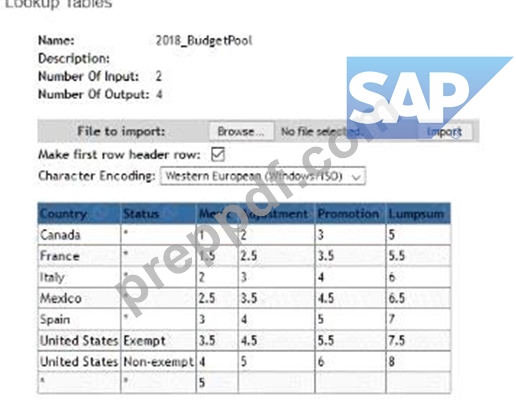
The budget is based on an employee s country and status In the template the country is defined with field ID customCountry and the status Is defined with field ID customStatus.What is the correct syntax to calculate the adjustment budget?
- A. toNumberflookup('2018_BudgetPoor. customCountry customStatus2))'curSalary
- B. toNumber(lookupf2018_BudgetPoor customCountrycustomStatus
- C. toNumber(lookup('20l8_BudgetPool'.customCountry.cuslomStatus.adjuslment))'curSalary
- D. Adjustment))*curSalary
- E. toNumbGr(lookupC20l8_BudgetPoor.customCountry.cu$tomStatu$.1))'curSalary
Answer: E
NEW QUESTION # 48
Your customer requires a field on the worksheet where planners can select from a list to categorize the reason for the employee receiving a lump sum. How can you achieve this?
- A. Create a read-only string field and make it reloadable
- B. Create an editable string field and make it reportable
- C. Create a read-only string field and make it reportable
- D. Create an editable string field with enumerated values
Answer: D
NEW QUESTION # 49
Your client wants to ensure that planners justify their decision to NOT give an employee a merit increase.What is the best way to accomplish this?
- A. Under Define Standard Validation Rules add a Force Comment Rule with the mode set to 'raise '
- B. Q Use custom validations with the formula if(merit>0.'FALSE .'TRUE
- C. Edit the XML and add a comp-force-comment-config tag with the mode attribute set to 'guideline '
- D. Under Define Standard Validation Rules add a Force Comment Rule with the mode set to 'no-raise '
Answer: D
NEW QUESTION # 50
Your client has a requirement for the salary process where the approval workflow should have the following main steps.1.Manager makes recommendations/2.Next Level Manager approves the recommendations but CANNOT send the form back for changes/3.Third level manager reviews the approval and CAN send the form back to the Next Level Manager for changes.How can you set up the system to meet this requirement?
- A. In the route map use a Collaboration step as the third step with EM as the Entry User and EMM as the Exit User
- B. In the route map use a Collaboration step as the third step with EM as the Entry User and EMM as the Exit User
- C. In the route map assign the third step to EMM and use the Out of Turn Access option under Advanced Options
- D. In the route map use an Iterative step as the third step with EM as the Entry User and EMM as the Exit User.
Answer: B
NEW QUESTION # 51
Your customer has the requirement where both sales and non-sales employees are included on a single compensation template. However, only sales employees are eligible for a lump sum award How can you configure a single standard compensation statement template to ensure that just sales employees have a Lump Sum item displayed on their letter?
- A. You can hide the Lump Sum column on the compensation worksheet using Field-Based Permissions If the column is hidden on the worksheet, it won t appear on the statement
- B. You can include the Lump Sum item in the statement template and put a disclaimer in the signature section alerting non-sales employees that that item pertains only to sales employees
- C. You can include the Lump Sum item in the statement template and set a condition on its display so that it will only be shown if it is greater than 0
Answer: C
NEW QUESTION # 52
You have configured a worksheet for a client that uses the following formula in a custom column of type Money (curSalary ' lookupCbudgettable" customCountry 1))/100. The lookup table 'budget_table' is configured with one input and one output There are three rows in the table*USA =5*GBR = 3*' = 2 When the worksheet loads the column displays correctly but when a merit value is changed il switches to NfA for the employee What could be done to fix this behavior?
- A. Remove the extra parentheses
- B. Surround the curSalary with the toString function
- C. Surround the lookup function with the toNumber function.
- D. Change the column to be of the Amount type
Answer: C
NEW QUESTION # 53
Your client requests that no employee be eligible for a merit increase greater than 10%.Which configuration steps must you perform?
- A. Enable a hard limit stop for the merit guideline in Admin Center.*Set the maximum value to 10 for all guideline formulas
- B. Enable a hard limit stop for the merit guideline in Admin Center*Set the maximum value to 0 10 for all guideline formulas
- C. Set the guideline pattern to be low-high*Set the high value for all guidelines to be 10.
- D. Create a guideline rule with the High/Low Action option set to Allow in Admin Center.*Define each guideline formula with a default value of 10
Answer: A
NEW QUESTION # 54
What happens when a mass change violates the guideline hard stops?
- A. Employees are brought to max of range
- B. Guideline will adjust on a pro rata basis
- C. Guideline hard stops will be skipped
- D. Employees' recommendations will be skipped
Answer: A
NEW QUESTION # 55
Your EC-integrated template has an Effective Date of April 1 under Worksheet Settings. Your eligibility rule states that only grade 1 employees are eligible for compensation. On March 1 an employee is grade 1. but on April 15 they are promoted to grade 2 On April 16 you run Update all worksheets with the checkbox 'Update worksheet to reflect any employee s eligibility changes selected.What happens on the worksheet for this employee?
- A. The employee remains on the worksheet but becomes grayed out.
- B. The employee Is removed from the worksheet
- C. The employee remains on the worksheet but their planning fields reset to default values
- D. The employee remains eligible for planning with no changes.
Answer: D
NEW QUESTION # 56
Your customer has an Employee Central integrated template with an effective date of March 1.2023. The template has a reloadable field that is mapped to the Pay Grade field in SAP SuccessFactors Employee Central The forms are launched on February 1. 2023. with a start date of March 1. 2023 An employee gets promoted on March 5, 2023. which includes a pay grade change.What is the effect on the value that is displayed when the planner opens the worksheet on March 6, 2023?
- A. The employee becomes ineligible
- B. The new pay grade is displayed
- C. The pay grade remains the same as it was when the forms were created
- D. New forms need to be created because an error will be shown
Answer: C
NEW QUESTION # 57
Your customer has part-time and full-time employees. You notice that for part-time employees, their compa-ratio in EC is different than in Compensation. What do you configure in the system to have it calculate the correct compa-ratio and take into account the FTE?
- A. Set the XML attribute isActualSalarylmported to False in the compensation plan template
- B. Set the XML attribute isActualSalarylmported to True in the compensation plan template
- C. Set COMPENSATION_SAL_RATE_TYPE in the user data file (UDF) to FULL-TIME or PART-TIME
- D. Set SALARY_PRORATING in the user data file (UDE) to the percent that the employees work full time
Answer: A
NEW QUESTION # 58
You cannot do this with a single statement template a second template must be created to include this item and statement groups used to assign the templates appropriately.Which of the following permissions are required to be able to use Executive Review offline edit to download modify and upload buk changes?Note There are 3 correct answers to this question.
- A. The user needs the Executive Review - Mass Action permission
- B. The user needs the Ad Hoc Reports for the Compensation Planning domain permission
- C. The user needs the Executive Review - Import permission.
- D. The user needs the Executive Review - Edit permission
- E. The user needs the Executive Review - Export permission
Answer: C,D,E
NEW QUESTION # 59
......
Free C_THR86_2311 Exam Dumps to Improve Exam Score: https://certkingdom.preppdf.com/SAP/C_THR86_2311-prepaway-exam-dumps.html