

Pass Exam Questions Efficiently With Professional-Machine-Learning-Engineer Questions (2025)
Professional-Machine-Learning-Engineer Questions - Truly Beneficial For Your Google Exam
Google Professional Machine Learning Engineer certification exam is considered one of the most challenging and prestigious certifications in the field of machine learning. Achieving this certification demonstrates that the candidate has the knowledge, skills, and expertise to design and implement machine learning solutions that meet the highest standards of quality and performance. Google Professional Machine Learning Engineer certification is a clear indication of the candidate's ability to leverage machine learning to solve complex business problems and drive innovation in the industry.
NEW QUESTION # 167
You are collaborating on a model prototype with your team. You need to create a Vertex Al Workbench environment for the members of your team and also limit access to other employees in your project. What should you do?
- A. 1. Grant the Vertex Al User role to the default Compute Engine service account.
2. Grant the Service Account User role to each team member on the default Compute Engine service account.
3. Provision a Vertex Al Workbench user-managed notebook instance that uses the default Compute Engine service account. - B. 1 Grant the Vertex Al User role to the primary team member.
2. Grant the Notebook Viewer role to the other team members.
3. Provision a Vertex Al Workbench user-managed notebook instance that uses the primary user's account. - C. 1 Create a new service account and grant it the Vertex Al User role.
2 Grant the Service Account User role to each team member on the service account.
3. Grant the Notebook Viewer role to each team member.
4 Provision a Vertex Al Workbench user-managed notebook instance that uses the new service account. - D. 1. Create a new service account and grant it the Notebook Viewer role.
2 Grant the Service Account User role to each team member on the service account.
3 Grant the Vertex Al User role to each team member.
4. Provision a Vertex Al Workbench user-managed notebook instance that uses the new service account.
Answer: C
Explanation:
To create a Vertex AI Workbench environment for your team and limit access to other employees in your project, you should follow these steps:
* Create a new service account and grant it the Vertex AI User role. This role grants full access to all resources in Vertex AI, including creating and managing notebook instances1.
* Grant the Service Account User role to each team member on the service account. This role allows the team members to impersonate the service account and use its permissions2.
* Grant the Notebook Viewer role to each team member. This role allows the team members to view and connect to the notebook instance, but not to modify or delete it3.
* Provision a Vertex AI Workbench user-managed notebook instance that uses the new service account.
This way, the notebook instance will run as the service account and only the team members who have the Service Account User and Notebook Viewer roles will be able to access it.
References:
* 1: Vertex AI access control with IAM | Google Cloud
* 2: Understanding service accounts | Cloud IAM Documentation
* 3: Manage access to a Vertex AI Workbench instance | Google Cloud
* [4]: Create and manage Vertex AI Workbench instances | Google Cloud
NEW QUESTION # 168
You work for a gaming company that develops massively multiplayer online (MMO) games. You built a TensorFlow model that predicts whether players will make in-app purchases of more than $10 in the next two weeks. The model's predictions will be used to adapt each user's game experience. User data is stored in BigQuery. How should you serve your model while optimizing cost, user experience, and ease of management?
- A. Import the model into BigQuery ML. Make predictions using batch reading data from BigQuery, and push the data to Cloud SQL
- B. Embed the model in the mobile application. Make predictions after every in-app purchase event is published in Pub/Sub, and push the data to Cloud SQL.
- C. Embed the model in the streaming Dataflow pipeline. Make predictions after every in-app purchase event is published in Pub/Sub, and push the data to Cloud SQL.
- D. Deploy the model to Vertex AI Prediction. Make predictions using batch reading data from Cloud Bigtable, and push the data to Cloud SQL.
Answer: D
Explanation:
The best option to serve the model while optimizing cost, user experience, and ease of management is to deploy the model to Vertex AI Prediction, which is a managed service that can scale up or down according to the demand and provide low latency and high availability. Vertex AI Prediction can also handle TensorFlow models natively, without requiring any additional steps or conversions. By using batch prediction, the model can process large volumes of data efficiently and periodically, without affecting the user experience. The data can be read from Cloud Bigtable, which is a scalable and performant NoSQL database that can store user data in a flexible schema. The predictions can then be pushed to Cloud SQL, which is a fully managed relational database that can store the predictions in a structured format and enable easy querying and analysis. This option also simplifies the management of the model and the data, as it leverages the existing Google Cloud services and does not require any additional infrastructure or code.
The other options are not optimal for the following reasons:
* A. Importing the model into BigQuery ML is not a good option, as it requires converting the TensorFlow model into a format that BigQuery ML can understand, which can introduce errors and reduce the performance. Moreover, BigQuery ML is not designed for serving real-time predictions, but rather for training and evaluating models using SQL queries. Reading and writing data from BigQuery and Cloud SQL can also incur additional costs and latency, as they are both relational databases that require schema definition and data transformation.
* C. Embedding the model in the mobile application is not a good option, as it increases the size and
* complexity of the application, and requires updating the application every time the model changes.
Moreover, it exposes the model to the users, which can pose security and privacy risks, as well as potential misuse or abuse. Additionally, it does not leverage the benefits of the cloud, such as scalability, reliability, and performance.
* D. Embedding the model in the streaming Dataflow pipeline is not a good option, as it requires building and maintaining a custom pipeline that can handle the model inference and data processing. This can increase the development and operational costs and complexity, as well as the potential for errors and failures. Moreover, it does not take advantage of the batch prediction feature of Vertex AI Prediction, which can optimize the resource utilization and cost efficiency.
References:
* Professional ML Engineer Exam Guide
* Preparing for Google Cloud Certification: Machine Learning Engineer Professional Certificate
* Google Cloud launches machine learning engineer certification
* Vertex AI Prediction documentation
* Cloud Bigtable documentation
* Cloud SQL documentation
NEW QUESTION # 169
You are developing ML models with Al Platform for image segmentation on CT scans. You frequently update your model architectures based on the newest available research papers, and have to rerun training on the same dataset to benchmark their performance. You want to minimize computation costs and manual intervention while having version control for your code. What should you do?
- A. Use Cloud Build linked with Cloud Source Repositories to trigger retraining when new code is pushed to the repository
- B. Create an automated workflow in Cloud Composer that runs daily and looks for changes in code in Cloud Storage using a sensor.
- C. Use the gcloud command-line tool to submit training jobs on Al Platform when you update your code
- D. Use Cloud Functions to identify changes to your code in Cloud Storage and trigger a retraining job
Answer: A
Explanation:
Developing ML models with AI Platform for image segmentation on CT scans requires a lot of computation and experimentation, as image segmentation is a complex and challenging task that involves assigning a label to each pixel in an image. Image segmentation can be used for various medical applications, such as tumor detection, organ segmentation, or lesion localization1 To minimize the computation costs and manual intervention while having version control for the code, one should use Cloud Build linked with Cloud Source Repositories to trigger retraining when new code is pushed to the repository. Cloud Build is a service that executes your builds on Google Cloud Platform infrastructure. Cloud Build can import source code from Cloud Source Repositories, Cloud Storage, GitHub, or Bitbucket, execute a build to your specifications, and produce artifacts such as Docker containers or Java archives2 Cloud Build allows you to set up automated triggers that start a build when changes are pushed to a source code repository. You can configure triggers to filter the changes based on the branch, tag, or file path3 Cloud Source Repositories is a service that provides fully managed private Git repositories on Google Cloud Platform. Cloud Source Repositories allows you to store, manage, and track your code using the Git version control system. You can also use Cloud Source Repositories to connect to other Google Cloud services, such as Cloud Build, Cloud Functions, or Cloud Run4 To use Cloud Build linked with Cloud Source Repositories to trigger retraining when new code is pushed to the repository, you need to do the following steps:
Create a Cloud Source Repository for your code, and push your code to the repository. You can use the Cloud SDK, Cloud Console, or Cloud Source Repositories API to create and manage your repository5 Create a Cloud Build trigger for your repository, and specify the build configuration and the trigger settings. You can use the Cloud SDK, Cloud Console, or Cloud Build API to create and manage your trigger.
Specify the steps of the build in a YAML or JSON file, such as installing the dependencies, running the tests, building the container image, and submitting the training job to AI Platform. You can also use the Cloud Build predefined or custom build steps to simplify your build configuration.
Push your new code to the repository, and the trigger will start the build automatically. You can monitor the status and logs of the build using the Cloud SDK, Cloud Console, or Cloud Build API.
The other options are not as easy or feasible. Using Cloud Functions to identify changes to your code in Cloud Storage and trigger a retraining job is not ideal, as Cloud Functions has limitations on the memory, CPU, and execution time, and does not provide a user interface for managing and tracking your builds. Using the gcloud command-line tool to submit training jobs on AI Platform when you update your code is not optimal, as it requires manual intervention and does not leverage the benefits of Cloud Build and its integration with Cloud Source Repositories. Creating an automated workflow in Cloud Composer that runs daily and looks for changes in code in Cloud Storage using a sensor is not relevant, as Cloud Composer is mainly designed for orchestrating complex workflows across multiple systems, and does not provide a version control system for your code.
NEW QUESTION # 170
You work for a gaming company that has millions of customers around the world. All games offer a chat feature that allows players to communicate with each other in real time. Messages can be typed in more than 20 languages and are translated in real time using the Cloud Translation API. You have been asked to build an ML system to moderate the chat in real time while assuring that the performance is uniform across the various languages and without changing the serving infrastructure.
You trained your first model using an in-house word2vec model for embedding the chat messages translated by the Cloud Translation API. However, the model has significant differences in performance across the different languages. How should you improve it?
- A. Add a regularization term such as the Min-Diff algorithm to the loss function.
- B. Remove moderation for languages for which the false positive rate is too high.
- C. Replace the in-house word2vec with GPT-3 or T5.
- D. Train a classifier using the chat messages in their original language.
Answer: D
Explanation:
The problem with the current approach is that it relies on the Cloud Translation API to translate the chat messages into a common language before embedding them with the in-house word2vec model. This introduces two sources of error: the translation quality and the word2vec quality. The translation quality may vary across different languages, depending on the availability of data and the complexity of the grammar and vocabulary. The word2vec quality may also vary depending on the size and diversity of the corpus used to train it. These errors may affect the performance of the classifier that moderates the chat messages, resulting in significant differences across the languages.
A better approach would be to train a classifier using the chat messages in their original language, without relying on the Cloud Translation API or the in-house word2vec model. This way, the classifier can learn the nuances and subtleties of each language, and avoid the errors introduced by the translation and embedding processes. This would also reduce the latency and cost of the moderation system, as it would not need to invoke the Cloud Translation API for every message. To train a classifier using the chat messages in their original language, one could use a multilingual pre-trained model such as mBERT or XLM-R, which can handle multiple languages and domains. Alternatively, one could train a separate classifier for each language, using a monolingual pre-trained model such as BERT or a custom model tailored to the specific language and task.
Reference:
Professional ML Engineer Exam Guide
Preparing for Google Cloud Certification: Machine Learning Engineer Professional Certificate Google Cloud launches machine learning engineer certification
[mBERT: Bidirectional Encoder Representations from Transformers]
[XLM-R: Unsupervised Cross-lingual Representation Learning at Scale]
[BERT: Pre-training of Deep Bidirectional Transformers for Language Understanding]
NEW QUESTION # 171
You need to execute a batch prediction on 100 million records in a BigQuery table with a custom TensorFlow DNN regressor model, and then store the predicted results in a BigQuery table. You want to minimize the effort required to build this inference pipeline. What should you do?
- A. Use the TensorFlow BigQuery reader to load the data, and use the BigQuery API to write the results to BigQuery.
- B. Create a Dataflow pipeline to convert the data in BigQuery to TFRecords. Run a batch inference on Vertex AI Prediction, and write the results to BigQuery.
- C. Import the TensorFlow model with BigQuery ML, and run the ml.predict function.
- D. Load the TensorFlow SavedModel in a Dataflow pipeline. Use the BigQuery I/O connector with a custom function to perform the inference within the pipeline, and write the results to BigQuery.
Answer: C
NEW QUESTION # 172
You are a data scientist at an industrial equipment manufacturing company. You are developing a regression model to estimate the power consumption in the company's manufacturing plants based on sensor data collected from all of the plants. The sensors collect tens of millions of records every day. You need to schedule daily training runs for your model that use all the data collected up to the current date. You want your model to scale smoothly and require minimal development work. What should you do?
- A. Develop a custom scikit-learn regression model, and optimize it using Vertex AI Training.
- B. Train a regression model using AutoML Tables.
- C. Develop a regression model using BigQuery ML.
- D. Develop a custom TensorFlow regression model, and optimize it using Vertex AI Training.
Answer: B
NEW QUESTION # 173
You work for a social media company. You need to detect whether posted images contain cars. Each training example is a member of exactly one class. You have trained an object detection neural network and deployed the model version to Al Platform Prediction for evaluation. Before deployment, you created an evaluation job and attached it to the Al Platform Prediction model version. You notice that the precision is lower than your business requirements allow. How should you adjust the model's final layer softmax threshold to increase precision?
- A. Decrease the number of false negatives
- B. Decrease the recall.
- C. Increase the recall
- D. Increase the number of false positives
Answer: B
Explanation:
Precision and recall are two common metrics for evaluating the performance of a classification model. Precision measures the proportion of positive predictions that are correct, while recall measures the proportion of positive examples that are correctly predicted. Precision and recall are inversely related, meaning that increasing one will decrease the other, and vice versa. The trade-off between precision and recall depends on the goal and the cost of the classification problem1.
For the use case of detecting whether posted images contain cars, precision is more important than recall, as the social media company wants to minimize the number of false positives, or images that are incorrectly labeled as containing cars. A high precision means that the model is confident and accurate in its positive predictions, while a low recall means that the model may miss some positive examples, or images that actually contain cars. The cost of missing some positive examples is lower than the cost of making wrong positive predictions, as the latter may affect the user experience and the reputation of the social media company.
The softmax function is a function that transforms a vector of real numbers into a probability distribution over the possible classes. The softmax function is often used as the final layer of a neural network for multi-class classification problems, as it assigns a probability to each class, and the class with the highest probability is chosen as the prediction. The softmax function is defined as:
softmax (x_i) exp (x_i) / sum_j exp (x_j)
where x_i is the input value for class i, and softmax (x_i) is the output probability for class i.
The softmax threshold is a parameter that determines the minimum probability that a class must have to be chosen as the prediction. For example, if the softmax threshold is 0.5, then the class with the highest probability must have at least 0.5 to be selected, otherwise the prediction is none. The softmax threshold can be used to adjust the trade-off between precision and recall, as a higher threshold will increase the precision and decrease the recall, while a lower threshold will decrease the precision and increase the recall2.
For the use case of detecting whether posted images contain cars, the best way to adjust the model's final layer softmax threshold to increase precision is to decrease the recall. This means that the softmax threshold should be increased, so that the model will only make positive predictions when it is highly confident, and avoid making false positives. By increasing the softmax threshold, the model will become more selective and accurate in its positive predictions, and improve the precision metric. Therefore, decreasing the recall is the best option for this use case.
Reference:
Precision and recall - Wikipedia
How to add a threshold in softmax scores - Stack Overflow
NEW QUESTION # 174
You have been asked to build a model using a dataset that is stored in a medium-sized (~10 GB) BigQuery table. You need to quickly determine whether this data is suitable for model development. You want to create a one-time report that includes both informative visualizations of data distributions and more sophisticated statistical analyses to share with other ML engineers on your team. You require maximum flexibility to create your report. What should you do?
- A. Use Dataprep to create the report.
- B. Use Vertex AI Workbench user-managed notebooks to generate the report.
- C. Use the output from TensorFlow Data Validation on Dataflow to generate the report.
- D. Use the Google Data Studio to create the report.
Answer: B
Explanation:
* Option A is correct because using Vertex AI Workbench user-managed notebooks to generate the report is the best way to quickly determine whether the data is suitable for model development, and to create a one-time report that includes both informative visualizations of data distributions and more sophisticated statistical analyses to share with other ML engineers on your team. Vertex AI Workbench is a service that allows you to create and use notebooks for ML development and experimentation. You can use Vertex AI Workbench to connect to your BigQuery table, query and analyze the data using SQL or Python, and create interactive charts and plots using libraries such as pandas, matplotlib, or seaborn.
You can also use Vertex AI Workbench to perform more advanced data analysis, such as outlier detection, feature engineering, or hypothesis testing, using libraries such as TensorFlow Data Validation, TensorFlow Transform, or SciPy. You can export your notebook as a PDF or HTML file, and share it with your team. Vertex AI Workbench provides maximum flexibility to create your report, as you can use any code or library that you want, and customize the report as you wish.
* Option B is incorrect because using Google Data Studio to create the report is not the most flexible way to quickly determine whether the data is suitable for model development, and to create a one-time report that includes both informative visualizations of data distributions and more sophisticated statistical analyses to share with other ML engineers on your team. Google Data Studio is a service that allows you to create and share interactive dashboards and reports using data from various sources, such as BigQuery, Google Sheets, or Google Analytics. You can use Google Data Studio to connect to your BigQuery table, explore and visualize the data using charts, tables, or maps, and apply filters, calculations, or aggregations to the data. However, Google Data Studio does not support more sophisticated statistical analyses, such as outlier detection, feature engineering, or hypothesis testing, which may be useful for model development. Moreover, Google Data Studio is more suitable for creating recurring reports that need to be updated frequently, rather than one-time reports that are static.
* Option C is incorrect because using the output from TensorFlow Data Validation on Dataflow to generate the report is not the most efficient way to quickly determine whether the data is suitable for model development, and to create a one-time report that includes both informative visualizations of data distributions and more sophisticated statistical analyses to share with other ML engineers on your team.
TensorFlow Data Validation is a library that allows you to explore, validate, and monitor the quality of your data for ML. You can use TensorFlow Data Validation to compute descriptive statistics, detect anomalies, infer schemas, and generate data visualizations for your data. Dataflow is a service that allows you to create and run scalable data processing pipelines using Apache Beam. You can use Dataflow to run TensorFlow Data Validation on large datasets, such as those stored in BigQuery.
However, this option is not very efficient, as it involves moving the data from BigQuery to Dataflow, creating and running the pipeline, and exporting the results. Moreover, this option does not provide maximum flexibility to create your report, as you are limited by the functionalities of TensorFlow Data Validation, and you may not be able to customize the report as you wish.
* Option D is incorrect because using Dataprep to create the report is not the most flexible way to quickly determine whether the data is suitable for model development, and to create a one-time report that includes both informative visualizations of data distributions and more sophisticated statistical analyses to share with other ML engineers on your team. Dataprep is a service that allows you to explore, clean, and transform your data for analysis or ML. You can use Dataprep to connect to your BigQuery table, inspect and profile the data using histograms, charts, or summary statistics, and apply transformations, such as filtering, joining, splitting, or aggregating, to the data. However, Dataprep does not support more
* sophisticated statistical analyses, such as outlier detection, feature engineering, or hypothesis testing, which may be useful for model development. Moreover, Dataprep is more suitable for creating data preparation workflows that need to be executed repeatedly, rather than one-time reports that are static.
References:
* Vertex AI Workbench documentation
* Google Data Studio documentation
* TensorFlow Data Validation documentation
* Dataflow documentation
* Dataprep documentation
* [BigQuery documentation]
* [pandas documentation]
* [matplotlib documentation]
* [seaborn documentation]
* [TensorFlow Transform documentation]
* [SciPy documentation]
* [Apache Beam documentation]
NEW QUESTION # 175
You work for a manufacturing company. You need to train a custom image classification model to detect product defects at the end of an assembly line Although your model is performing well some images in your holdout set are consistently mislabeled with high confidence You want to use Vertex Al to understand your model's results What should you do?
- A.

- B.

- C.

- D.

Answer: C
Explanation:
Vertex Explainable AI is a set of tools and frameworks to help you understand and interpret predictions made by your machine learning models, natively integrated with a number of Google's products and services1. With Vertex Explainable AI, you can generate feature-based explanations that show how much each input feature contributed to the model's prediction2. This can help you debug and improve your model performance, and build confidence in your model's behavior. Feature-based explanations are supported for custom image classification models deployed on Vertex AI Prediction3. References:
* Explainable AI | Google Cloud
* Introduction to Vertex Explainable AI | Vertex AI | Google Cloud
* Supported model types for feature-based explanations | Vertex AI | Google Cloud
NEW QUESTION # 176
You created an ML pipeline with multiple input parameters. You want to investigate the tradeoffs between different parameter combinations. The parameter options are
* input dataset
* Max tree depth of the boosted tree regressor
* Optimizer learning rate
You need to compare the pipeline performance of the different parameter combinations measured in F1 score, time to train and model complexity. You want your approach to be reproducible and track all pipeline runs on the same platform. What should you do?
- A. 1 Create a Vertex Al pipeline with a custom model training job as part of the pipeline Configure the pipeline's parameters to include those you are investigating
2 In the custom training step, use the Bayesian optimization method with F1 score as the target to maximize - B. 1 Create a Vertex Al Workbench notebook for each of the different input datasets
2 In each notebook, run different local training jobs with different combinations of the max tree depth and optimizer learning rate parameters
3 After each notebook finishes, append the results to a BigQuery table - C. 1 Use BigQueryML to create a boosted tree regressor and use the hyperparameter tuning capability
2 Configure the hyperparameter syntax to select different input datasets. max tree depths, and optimizer teaming rates Choose the grid search option - D. 1 Create an experiment in Vertex Al Experiments
2. Create a Vertex Al pipeline with a custom model training job as part of the pipeline. Configure the pipelines parameters to include those you are investigating
3. Submit multiple runs to the same experiment using different values for the parameters
Answer: D
Explanation:
The best option for investigating the tradeoffs between different parameter combinations is to create an experiment in Vertex AI Experiments, create a Vertex AI pipeline with a custom model training job as part of the pipeline, configure the pipeline's parameters to include those you are investigating, and submit multiple runs to the same experiment using different values for the parameters. This option allows you to leverage the power and flexibility of Google Cloud to compare the pipeline performance of the different parameter combinations measured in F1 score, time to train, and model complexity. Vertex AI Experiments is a service that can track and compare the results of multiple machine learning runs. Vertex AI Experiments can record the metrics, parameters, and artifacts of each run, and display them in a dashboard for easy visualization and analysis. Vertex AI Experiments can also help users optimize the hyperparameters of their models by using different search algorithms, such as grid search, random search, or Bayesian optimization1. Vertex AI Pipelines is a service that can orchestrate machine learning workflows using Vertex AI. Vertex AI Pipelines can run preprocessing and training steps on custom Docker images, and evaluate, deploy, and monitor the machine learning model. A custom model training job is a type of pipeline step that can train a custom model by using a user-provided script or container. A custom model training job can accept pipeline parameters as inputs, which can be used to control the training logic or data source. By creating an experiment in Vertex AI Experiments, creating a Vertex AI pipeline with a custom model training job as part of the pipeline, configuring the pipeline's parameters to include those you are investigating, and submitting multiple runs to the same experiment using different values for the parameters, you can create a reproducible and trackable approach to investigate the tradeoffs between different parameter combinations.
The other options are not as good as option D, for the following reasons:
* Option A: Using BigQuery ML to create a boosted tree regressor and use the hyperparameter tuning capability, configuring the hyperparameter syntax to select different input datasets, max tree depths, and optimizer learning rates, and choosing the grid search option would not be able to handle different input datasets as a hyperparameter, and would not be as flexible and scalable as using Vertex AI Experiments and Vertex AI Pipelines. BigQuery ML is a service that can create and train machine learning models by
* using SQL queries on BigQuery. BigQuery ML can perform hyperparameter tuning by using the ML.FORECAST or ML.PREDICT functions, and specifying the hyperparameters option. BigQuery ML can also use different search algorithms, such as grid search, random search, or Bayesian optimization, to find the optimal hyperparameters. However, BigQuery ML can only tune the hyperparameters that are related to the model architecture or training process, such as max tree depth or learning rate. BigQuery ML cannot tune the hyperparameters that are related to the data source, such as input dataset. Moreover, BigQuery ML is not designed to work with Vertex AI Experiments or Vertex AI Pipelines, which can provide more features and flexibility for tracking and orchestrating machine learning workflows2.
* Option B: Creating a Vertex AI pipeline with a custom model training job as part of the pipeline, configuring the pipeline's parameters to include those you are investigating, and using the Bayesian optimization method with F1 score as the target to maximize in the custom training step would not be able to track and compare the results of multiple runs, and would require more skills and steps than using Vertex AI Experiments and Vertex AI Pipelines. Vertex AI Pipelines is a service that can orchestrate machine learning workflows using Vertex AI. Vertex AI Pipelines can run preprocessing and training steps on custom Docker images, and evaluate, deploy, and monitor the machine learning model.
A custom model training job is a type of pipeline step that can train a custom model by using a user-provided script or container. A custom model training job can accept pipeline parameters as inputs, which can be used to control the training logic or data source. However, using the Bayesian optimization method with F1 score as the target to maximize in the custom training step would require writing code, implementing the optimization algorithm, and defining the objective function. Moreover, this option would not be able to track and compare the results of multiple runs, as Vertex AI Pipelines does not have a built-in feature for recording and displaying the metrics, parameters, and artifacts of each run3.
* Option C: Creating a Vertex AI Workbench notebook for each of the different input datasets, running different local training jobs with different combinations of the max tree depth and optimizer learning rate parameters, and appending the results to a BigQuery table would not be able to track and compare the results of multiple runs on the same platform, and would require more skills and steps than using Vertex AI Experiments and Vertex AI Pipelines. Vertex AI Workbench is a service that provides an integrated development environment for data science and machine learning. Vertex AI Workbench allows users to create and run Jupyter notebooks on Google Cloud, and access various tools and libraries for data analysis and machine learning. However, creating a Vertex AI Workbench notebook for each of the different input datasets, running different local training jobs with different combinations of the max tree depth and optimizer learning rate parameters, and appending the results to a BigQuery table would require creating multiple notebooks, writing code, setting up local environments, connecting to BigQuery, loading and preprocessing the data, training and evaluating the model, and writing the results to a BigQuery table. Moreover, this option would not be ableto track and compare the results of multiple runs on the same platform, as BigQuery is a separate service from Vertex AI Workbench, and does not have a dashboard for visualizing and analyzing the metrics, parameters, and artifacts of each run4.
References:
* Preparing for Google Cloud Certification: Machine Learning Engineer, Course 3: Production ML Systems, Week 3: MLOps
* Google Cloud Professional Machine Learning Engineer Exam Guide, Section 1: Architecting low-code ML solutions, 1.1 Developing ML models by using BigQuery ML
* Official Google Cloud Certified Professional Machine Learning Engineer Study Guide, Chapter 3: Data Engineering for ML, Section 3.2: BigQuery for ML
* Vertex AI Experiments
* Vertex AI Pipelines
* BigQuery ML
* Vertex AI Workbench
NEW QUESTION # 177
You are an ML engineer at an ecommerce company and have been tasked with building a model that predicts how much inventory the logistics team should order each month. Which approach should you take?
- A. Use a regression model to predict how much additional inventory should be purchased each month. Give the results to the logistics team at the beginning of the month so they can increase inventory by the amount predicted by the model.
- B. Use a classification model to classify inventory levels as UNDER_STOCKED, OVER_STOCKED, and CORRECTLY_STOCKED. Give the report to the logistics team each month so they can fine-tune inventory levels.
- C. Use a time series forecasting model to predict each item's monthly sales. Give the results to the logistics team so they can base inventory on the amount predicted by the model.
- D. Use a clustering algorithm to group popular items together. Give the list to the logistics team so they can increase inventory of the popular items.
Answer: C
Explanation:
The best approach to build a model that predicts how much inventory the logistics team should order each month is to use a time series forecasting model to predict each item's monthly sales. This approach can capture the temporal patterns and trends in the sales data, such as seasonality, cyclicality, and autocorrelation. It can also account for the variability and uncertainty in the demand, and provide confidence intervals and error metrics for the predictions. By using a time series forecasting model, you can provide the logistics team with accurate and reliable estimates of the future sales for each item, which can help them optimize the inventory levels and avoid overstocking or understocking. You can use various methods and tools to build a time series forecasting model, such as ARIMA, LSTM, Prophet, or BigQuery ML.
The other options are not optimal for the following reasons:
* A. Using a clustering algorithm to group popular items together is not a good approach, as it does not provide any quantitative or temporal information about the sales or the inventory. It only provides a qualitative and static categorization of the items based on their similarity or dissimilarity. Moreover, clustering is an unsupervised learning technique, which does not use any target variable or feedback to guide the learning process. This can result in arbitrary and inconsistent clusters, which may not reflect the true demand or preferences of the customers.
* B. Using a regression model to predict how much additional inventory should be purchased each month is not a good approach, as it does not account for the individual differences and dynamics of each item.
It only provides a single aggregated value for the whole inventory, which can be misleading and inaccurate. Moreover, a regression model is not well-suited for handling time series data, as it assumes that the data points are independent and identically distributed, which is not the case for sales data. A regression model can also suffer from overfitting or underfitting, depending on the choice and complexity of the features and the model.
* D. Using a classification model to classify inventory levels as UNDER_STOCKED, OVER_STOCKED, and CORRECTLY_STOCKED is not a good approach, as it does not provide any numerical or predictive information about the sales or the inventory. It only provides a discrete and subjective label for the inventory levels, which can be vague and ambiguous. Moreover, a classification model is not well-suited for handling time series data, as it assumes that the data points are independent and identically distributed, which is not the case for sales data. A classification model can also suffer
* from class imbalance, misclassification, or overfitting, depending on the choice and complexity of the features, the model, and the threshold.
References:
* Professional ML Engineer Exam Guide
* Preparing for Google Cloud Certification: Machine Learning Engineer Professional Certificate
* Google Cloud launches machine learning engineer certification
* Time Series Forecasting: Principles and Practice
* BigQuery ML: Time series analysis
NEW QUESTION # 178
You are analyzing customer data for a healthcare organization that is stored in Cloud Storage. The data contains personally identifiable information (PII) You need to perform data exploration and preprocessing while ensuring the security and privacy of sensitive fields What should you do?
- A. Use Google-managed encryption keys to encrypt the Pll data at rest, and decrypt the Pll data during data exploration and preprocessing.
- B. Use the Cloud Data Loss Prevention (DLP) API to de-identify the PI! before performing data exploration and preprocessing.
- C. Use a VM inside a VPC Service Controls security perimeter to perform data exploration and preprocessing.
- D. Use customer-managed encryption keys (CMEK) to encrypt the Pll data at rest and decrypt the Pll data during data exploration and preprocessing.
Answer: B
Explanation:
According to the official exam guide1, one of the skills assessed in the exam is to "design, build, and productionalize ML models to solve business challenges using Google Cloud technologies". Cloud Data Loss Prevention (DLP) API2 is a service that provides programmatic access to a powerful detection engine for personally identifiable information and other privacy-sensitive data in unstructured data streams, such as text blocks and images. Cloud DLP API helps you discover, classify, and protect your sensitive data by using techniques such as de-identification, masking, tokenization, and bucketing. You can use Cloud DLP API to de-identify the PII data before performing data exploration and preprocessing, and retain the data utility for ML purposes. Therefore, option A is the best way to perform data exploration and preprocessing while ensuring the security and privacy of sensitive fields. The other options are not relevant or optimal for this scenario. References:
* Professional ML Engineer Exam Guide
* Cloud Data Loss Prevention (DLP) API
* Google Professional Machine Learning Certification Exam 2023
* Latest Google Professional Machine Learning Engineer Actual Free Exam Questions
NEW QUESTION # 179
You are developing an image recognition model using PyTorch based on ResNet50 architecture. Your code is working fine on your local laptop on a small subsample. Your full dataset has 200k labeled images You want to quickly scale your training workload while minimizing cost. You plan to use 4 V100 GPUs. What should you do? (Choose Correct Answer and Give References and Explanation)
- A. Package your code with Setuptools. and use a pre-built container Train your model with Vertex Al using a custom tier that contains the required GPUs.
- B. Configure a Compute Engine VM with all the dependencies that launches the training Train your model with Vertex Al using a custom tier that contains the required GPUs.
- C. Create a Google Kubernetes Engine cluster with a node pool that has 4 V100 GPUs Prepare and submit a TFJob operator to this node pool.
- D. Create a Vertex Al Workbench user-managed notebooks instance with 4 V100 GPUs, and use it to train your model
Answer: A
Explanation:
The best option for scaling the training workload while minimizing cost is to package the code with Setuptools, and use a pre-built container. Train the model with Vertex AI using a custom tier that contains the required GPUs. This option has the following advantages:
* It allows the code to be easily packaged and deployed, as Setuptools is a Python tool that helps to create and distribute Python packages, and pre-built containers are Docker images that contain all the dependencies and libraries needed to run the code. By packaging thecode with Setuptools, and using a pre-built container, you can avoid the hassle and complexity of building and maintaining your own custom container, and ensure the compatibility and portability of your code across different environments.
* It leverages the scalability and performance of Vertex AI, which is a fully managed service that provides various tools and features for machine learning, such as training, tuning, serving, and monitoring. By training the model with Vertex AI, you can take advantage of the distributed and parallel training capabilities of Vertex AI, which can speed up the training process and improve the model quality.
Vertex AI also supports various frameworks and models, such as PyTorch and ResNet50, and allows you to use custom containers and custom tiers to customize your training configuration and resources.
* It reduces the cost and complexity of the training process, as Vertex AI allows you to use a custom tier that contains the required GPUs, which can optimize the resource utilization and allocation for your training job. By using a custom tier that contains 4 V100 GPUs, you can match the number and type of GPUs that you plan to use for your training job, and avoid paying for unnecessary or underutilized resources. Vertex AI also offers various pricing options and discounts, such as per-second billing, sustained use discounts, and preemptible VMs, that can lower the cost of the training process.
The other options are less optimal for the following reasons:
* Option A: Configuring a Compute Engine VM with all the dependencies that launches the training.
Train the model with Vertex AI using a custom tier that contains the required GPUs, introduces additional complexity and overhead. This option requires creating and managing a Compute Engine VM, which is a virtual machine that runs on Google Cloud. However, using a Compute Engine VM to launch the training may not be necessary or efficient, as it requires installing and configuring all the dependencies and libraries needed to run the code, and maintaining and updating the VM. Moreover, using a Compute Engine VM to launch the training may incur additional cost and latency, as it requires paying for the VM usage and transferring the data and the code between the VM and Vertex AI.
* Option C: Creating a Vertex AI Workbench user-managed notebooks instance with 4 V100 GPUs, and using it to train the model, introduces additional cost and risk. This option requires creating and managing a Vertex AI Workbench user-managed notebooks instance, which is a service that allows you to create and run Jupyter notebooks on Google Cloud. However, using a Vertex AI Workbench user-managed notebooks instance to train the model may not be optimal or secure, as it requires paying for the notebooks instance usage, which can be expensive and wasteful, especially if the notebooks instance is not used for other purposes. Moreover, using a Vertex AI Workbench user-managed notebooks instance to train the model may expose the model and the data to potential security or privacy issues, as the notebooks instance is not fully managed by Google Cloud, and may be accessed or modified by unauthorized users or malicious actors.
* Option D: Creating a Google Kubernetes Engine cluster with a node pool that has 4 V100 GPUs.
Prepare and submit a TFJob operator to this node pool, introduces additional complexity and cost. This option requires creating and managing a Google Kubernetes Engine cluster, which is a fully managed service that runs Kubernetes clusters on Google Cloud. Moreover, this option requires creating and managing a node pool that has 4 V100 GPUs,which is a group of nodes that share the same configuration and resources. Furthermore, this option requires preparing and submitting a TFJob
* operator to this node pool, which is a Kubernetes custom resource that defines a TensorFlow training job. However, using Google Kubernetes Engine, node pool, and TFJob operator to train the model may not be necessary or efficient, as it requires configuring and maintaining the cluster, the node pool, and the TFJob operator, and paying for their usage. Moreover, using Google Kubernetes Engine, node pool, and TFJob operator to train the model may not be compatible or scalable, as they are designed for TensorFlow models, not PyTorch models, and may not support distributed or parallel training.
References:
* [Vertex AI: Training with custom containers]
* [Vertex AI: Using custom machine types]
* [Setuptools documentation]
* [PyTorch documentation]
* [ResNet50 | PyTorch]
NEW QUESTION # 180
You are going to train a DNN regression model with Keras APIs using this code: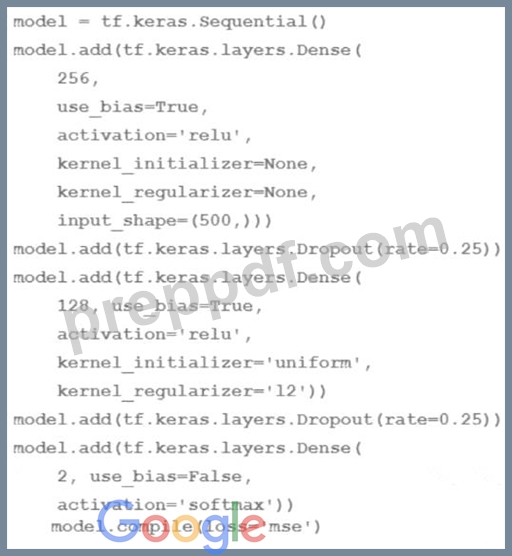
How many trainable weights does your model have? (The arithmetic below is correct.)
- A. 501*256+257*128+2 = 161154
- B. 501*256+257*128+128*2=161408
- C. 500*256+256*128+128*2 = 161024
- D. 500*256*0 25+256*128*0 25+128*2 = 40448
Answer: C
Explanation:
The number of trainable weights in a DNN regression model with Keras APIs can be calculated by multiplying the number of input units by the number of output units for each layer, and adding the number of bias units for each layer. The bias units are usually equal to the number of output units,except for the last layer, which does not have bias units if the activation function is softmax1. In this code, the model has three layers: a dense layer with 256 units and relu activation, a dropout layer with 0.25 rate, and a dense layer with 2 units and softmax activation. The input shape is 500. Therefore, the number of trainable weights is:
* For the first layer: 500 input units * 256 output units + 256 bias units = 128256
* For the second layer: The dropout layer does not have any trainable weights, as it only randomly sets some of the input units to zero to prevent overfitting2.
* For the third layer: 256 input units * 2 output units + 0 bias units = 512 The total number of trainable weights is 128256 + 512 = 161024. Therefore, the correct answer is B.
References:
* How to calculate the number of parameters for a Convolutional Neural Network?
* Dropout (keras.io)
NEW QUESTION # 181
Your work for a textile manufacturing company. Your company has hundreds of machines and each machine has many sensors. Your team used the sensory data to build hundreds of ML models that detect machine anomalies Models are retrained daily and you need to deploy these models in a cost-effective way. The models must operate 24/7 without downtime and make sub millisecond predictions. What should you do?
- A. Deploy a Dataflow batch pipeline with the Runlnference API. and use model refresh.
- B. Deploy a Dataflow batch pipeline and a Vertex Al Prediction endpoint.
- C. Deploy a Dataflow streaming pipeline and a Vertex Al Prediction endpoint with autoscaling.
- D. Deploy a Dataflow streaming pipeline with the Runlnference API and use automatic model refresh.
Answer: D
Explanation:
A Dataflow streaming pipeline is a cost-effective way to process large volumes of real-time data from sensors. The RunInference API is a Dataflow transform that allows you to run online predictions on your streaming data using your ML models. By using the RunInference API, you can avoid the latency and cost of using a separate prediction service. The automatic model refresh feature enables you to update your models in the pipeline without redeploying the pipeline. This way, you can ensure that your models are always up-to- date and accurate. By deploying a Dataflow streaming pipeline with the RunInference API and using automatic model refresh, you can achieve sub-millisecond predictions, 24/7 availability, and low operational overhead for your ML models. References:
* Dataflow documentation
* RunInference API documentation
* Automatic model refresh documentation
* Preparing for Google Cloud Certification: Machine Learning Engineer Professional Certificate
NEW QUESTION # 182
You need to analyze user activity data from your company's mobile applications. Your team will use BigQuery for data analysis, transformation, and experimentation with ML algorithms. You need to ensure real-time ingestion of the user activity data into BigQuery. What should you do?
- A. Run an Apache Spark streaming job on Dataproc to ingest the data into BigQuery.
- B. Configure Pub/Sub to stream the data into BigQuery.
- C. Run a Dataflow streaming job to ingest the data into BigQuery.
- D. Configure Pub/Sub and a Dataflow streaming job to ingest the data into BigQuery,
Answer: B
Explanation:
Pub/Sub is a messaging service that can be used to stream data into BigQuery in real-time. Configuring Pub/Sub to stream the user activity data into BigQuery would ensure real-time ingestion of the data. Source: Google Cloud
NEW QUESTION # 183
You are an AI architect at a popular photo-sharing social media platform. Your organization's content moderation team currently scans images uploaded by users and removes explicit images manually. You want to implement an AI service to automatically prevent users from uploading explicit images. What should you do?
- A. Develop a custom TensorFlow model in a Vertex AI Workbench instance. Train the model on a dataset of manually labeled images. Deploy the model to a Vertex AI endpoint. Run periodic batch inference to identify inappropriate uploads and report them to the content moderation team.
- B. Send a copy of every user-uploaded image to a Cloud Storage bucket. Configure a Cloud Run function that triggers the Cloud Vision API to detect explicit content each time a new image is uploaded. Report the classifications to the content moderation team for review.
- C. Train an image clustering model using TensorFlow in a Vertex AI Workbench instance. Deploy this model to a Vertex AI endpoint and configure it for online inference. Run this model each time a new image is uploaded to identify and block inappropriate uploads.
- D. Create a dataset using manually labeled images. Ingest this dataset into AutoML. Train an image classification model and deploy it to a Vertex AI endpoint. Integrate this endpoint with the image upload process to identify and block inappropriate uploads. Monitor predictions and periodically retrain the model.
Answer: B
Explanation:
Cloud Vision API offers pre-trained models specialized in identifying explicit or inappropriate content. By sending a copy of each image to a Cloud Storage bucket and triggering Cloud Vision through Cloud Run, the detection of explicit content is automated with minimal development time. Vertex AI custom models require more training data and infrastructure management, while AutoML-based solutions add more complexity. Cloud Vision's existing capabilities meet the requirement effectively and are highly scalable for real-time moderation needs.
NEW QUESTION # 184
You have been tasked with deploying prototype code to production. The feature engineering code is in PySpark and runs on Dataproc Serverless. The model training is executed by using a Vertex Al custom training job. The two steps are not connected, and the model training must currently be run manually after the feature engineering step finishes. You need to create a scalable and maintainable production process that runs end-to-end and tracks the connections between steps. What should you do?
- A. Create a Vertex Al Pipelines job to link and run both components Use the Kubeflow pipelines SDK to write code that specifies two components
- The first component initiates an Apache Spark context that runs the PySpark feature engineering code
- The second component runs the TensorFlow custom model training code Create a Vertex Al Pipelines job to link and run both components - B. Create a Vertex Al Workbench notebook Initiate an Apache Spark context in the notebook, and run the PySpark feature engineering code Use the same notebook to run the custom model training job in TensorFlow Run the notebook cells sequentially to tie the steps together end-to-end
- C. Create a Vertex Al Workbench notebook Use the notebook to submit the Dataproc Serverless feature engineering job Use the same notebook to submit the custom model training job Run the notebook cells sequentially to tie the steps together end-to-end
- D. Use the Kubeflow pipelines SDK to write code that specifies two components
- The first is a Dataproc Serverless component that launches the feature engineering job
- The second is a custom component wrapped in the
creare_cusrora_rraining_job_from_ccraponent Utility that launches the custom model training job.
Answer: D
Explanation:
The best option for creating a scalable and maintainable production process that runs end-to-end and tracks the connections between steps, using prototype code to production, feature engineering code in PySpark that runs on Dataproc Serverless, and model training that is executed by using a Vertex AI custom training job, is to use the Kubeflow pipelines SDK to write code that specifies two components. The first is a Dataproc Serverless component that launches the feature engineering job. The second is a custom component wrapped in the create_custom_training_job_from_component utility that launches the custom model training job. This option allows you to leverage the power and simplicity of Kubeflow pipelines to orchestrate and automate your machine learning workflows on Vertex AI. Kubeflow pipelines is a platform that can build, deploy, and manage machine learning pipelines on Kubernetes. Kubeflow pipelines can help you create reusable and scalable pipelines, experiment with different pipeline versions and parameters, and monitor and debug your pipelines. Kubeflow pipelines SDK is a set of Python packages that can help you build and run Kubeflow pipelines. Kubeflow pipelines SDK can help you define pipeline components, specify pipeline parameters and inputs, and create pipeline steps and tasks. A component is a self-contained set of code that performs one step in a pipeline, such as data preprocessing, model training, or model evaluation. A component can be created from a Python function, a container image, or a prebuilt component. A custom component is a component that is not provided by Kubeflow pipelines, but is created by the user to perform a specific task. A custom component can be wrapped in a utility function that can help you create a Vertex AI custom training job from the component. A custom training job is a resource that can run your custom training code on Vertex AI. A custom training job can help you train various types of models, such as linear regression, logistic regression, k-means clustering, matrix factorization, and deep neural networks. By using the Kubeflow pipelines SDK to write code that specifies two components, the first is a Dataproc Serverless component that launches the feature engineering job, and the second is a custom component wrapped in the create_custom_training_job_from_component utility that launches the custom model training job, you can create a scalable and maintainable production process that runs end-to-end and tracks the connections between steps. You can write code that defines the two components, their inputs and outputs, and their dependencies.
You can then use the Kubeflow pipelines SDK to create a pipeline that runs the two components in sequence, and submit the pipeline to Vertex AI Pipelines for execution. By using Dataproc Serverless component, you can run your PySpark feature engineering code on Dataproc Serverless, which is a service that can run Spark batch workloads without provisioning and managing your own cluster. By using custom component wrapped in the create_custom_training_job_from_component utility, you can run your custom model training code on Vertex AI, which is a unified platform for building and deploying machine learning solutions on Google Cloud1.
The other options are not as good as option C, for the following reasons:
* Option A: Creating a Vertex AI Workbench notebook, using the notebook to submit the Dataproc Serverless feature engineering job, using the same notebook to submit the custom model training job, and running the notebook cells sequentially to tie the steps together end-to-end would require more skills and steps than using the Kubeflow pipelines SDK to write code that specifies two components, the first is a Dataproc Serverless component that launches the feature engineering job, and the second is a custom component wrapped in the create_custom_training_job_from_component utility that launches the custom model training job. Vertex AI Workbench is a service that can provide managed notebooks for machine learning development and experimentation. Vertex AI Workbench can help you create and run JupyterLab notebooks, and access various tools and frameworks, such as TensorFlow, PyTorch, and JAX. By creating a Vertex AI Workbench notebook, using the notebook to submit the Dataproc Serverless feature engineering job, using the same notebook to submit the custom model training job, and running the notebook cells sequentially to tie the steps together end-to-end, you can create a production process that runs end-to-end and tracks the connections between steps. You can write code that submits the Dataproc Serverless feature engineering job and the custom model training job to Vertex AI, and run the code in the notebook cells. However, creating a Vertex AI Workbench notebook, using the notebook to submit the Dataproc Serverless feature engineering job, using the same notebook to submit the custom model training job, and running the notebook cells sequentially to tie the steps together end-to-end would require more skills and steps than using the Kubeflow pipelines SDK to write code that specifies two components, the first is a Dataproc Serverless component that launches the feature engineering job, and the second is a custom component wrapped in the create_custom_training_job_from_component utility that launches the custom model training job. You would need to write code, create and configure the Vertex AI Workbench notebook, submit the Dataproc Serverless feature engineering job and the custom model training job, and run the notebook cells. Moreover, this option would not use the Kubeflow pipelines SDK, which can simplify the pipeline creation and execution process, and provide various features, such as pipeline parameters, pipeline metrics, and pipeline visualization2.
* Option B: Creating a Vertex AI Workbench notebook, initiating an Apache Spark context in the notebook, and running the PySpark feature engineering code, using the same notebook to run the custom model training job in TensorFlow, and running the notebook cells sequentially to tie the steps together end-to-end would not allow you to use Dataproc Serverless to run the feature engineering job, and could increase the complexity and cost of the production process. Apache Spark is a framework that can perform large-scale data processing and machine learning. Apache Spark can help you run various tasks, such as data ingestion, data transformation, data analysis, and data visualization. PySpark is a Python API for Apache Spark. PySpark can help you write and run Spark code in Python. An Apache Spark context is a resource that can initialize and configure the Spark environment. An Apache Spark context can help you create and manage Spark objects, such as SparkSession, SparkConf, and SparkContext. By creating a Vertex AI Workbench notebook, initiating an Apache Spark context in the notebook, and running the PySpark feature engineering code, using the same notebook to run the custom model training job in TensorFlow, and running the notebook cells sequentially to tie the steps together end-to-end, you can create a production process that runs end-to-end and tracks the connections between steps. You can write code that initiates an Apache Spark context and runs the PySpark feature engineering code, and runs the custom model training job in TensorFlow, and run the code in the notebook cells. However, creating a Vertex AI Workbench notebook, initiating an Apache Spark context in the notebook, and running the PySpark feature engineering code, using the same notebook to run the
* custom model training job in TensorFlow, and running the notebook cells sequentially to tie the steps together end-to-end would not allow you to use Dataproc Serverless to run the feature engineering job, and could increase the complexity and cost of the production process. You would need to write code, create and configure the Vertex AI Workbench notebook, initiate and configure the Apache Spark context, run the PySpark feature engineering code, and run the custom model training job in TensorFlow. Moreover, this option would not use Dataproc Serverless, which is a service that can run Spark batch workloads without provisioning and managing your own cluster, and provide various benefits, such as autoscaling, dynamic resource allocation, and serverless billing2.
* Option D: Creating a Vertex AI Pipelines job to link and run both components, using the Kubeflow pipelines SDK to write code that specifies two components, the first component initiates an Apache Spark context that runs the PySpark feature engineering code, and the second component runs the TensorFlow custom model training code, would not allow you to use Dataproc Serverless to run the feature engineering job, and could increase the complexity and cost of the production process. Vertex AI Pipelines is a service that can run Kubeflow pipelines on Vertex AI. Vertex AI Pipelines can help you create and manage machine learning pipelines, and integrate with various Vertex AI services, such as Vertex AI Workbench, Vertex AI Training, and Vertex AI Prediction. A Vertex AI Pipelines job is a resource that can execute a pipeline on Vertex AI Pipelines. A Vertex AI Pipelines job can help you run your pipeline steps and tasks, and monitor and debug your pipeline execution. By creating a Vertex AI Pipelines job to link and run both components, using the Kubeflow pipelines SDK to write code that specifies two components, the first component initiates an Apache Spark context that runs the PySpark feature engineering code, and the second component runs the TensorFlow custom model training code, you can create a scalable and maintainable production process that runs end-to-end and tracks the connections between steps. You can write code that defines the two components, their inputs and outputs, and their dependencies. You can then use the Kubeflow pipelines SDK to create a pipeline that runs the two components in sequence, and submit the pipeline to Vertex AI Pipelines for execution.
However, creating a Vertex AI Pipelines job to link and run both components, using the Kubeflow pipelines SDK to write code that specifies two components, the first component initiates an Apache Spark context that runs the PySpark feature engineering code,
NEW QUESTION # 185
You are training an LSTM-based model on Al Platform to summarize text using the following job submission script: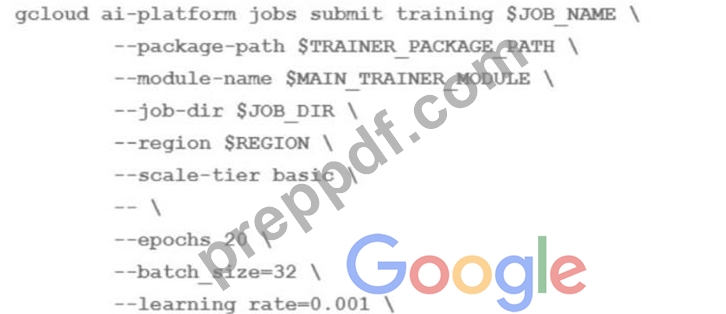
You want to ensure that training time is minimized without significantly compromising the accuracy of your model. What should you do?
- A. Modify the batch size' parameter
- B. Modify the 'learning rate' parameter
- C. Modify the 'epochs' parameter
- D. Modify the 'scale-tier' parameter
Answer: C
NEW QUESTION # 186
You are an ML engineer in the contact center of a large enterprise. You need to build a sentiment analysis tool that predicts customer sentiment from recorded phone conversations. You need to identify the best approach to building a model while ensuring that the gender, age, and cultural differences of the customers who called the contact center do not impact any stage of the model development pipeline and results. What should you do?
- A. Extract sentiment directly from the voice recordings
- B. Convert the speech to text and build a model based on the words
- C. Convert the speech to text and extract sentiment using syntactical analysis
- D. Convert the speech to text and extract sentiments based on the sentences
Answer: D
NEW QUESTION # 187
You are training an LSTM-based model on Al Platform to summarize text using the following job submission script: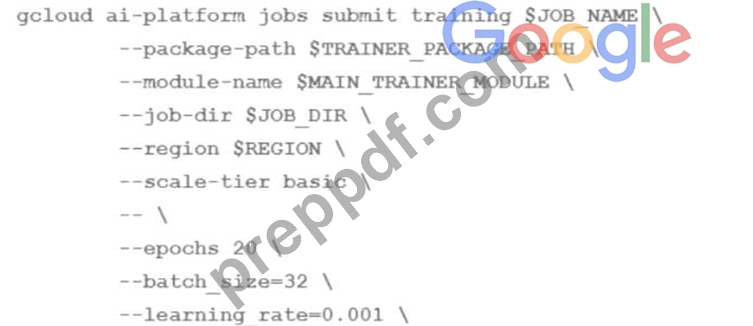
You want to ensure that training time is minimized without significantly compromising the accuracy of your model. What should you do?
- A. Modify the 'scale-tier' parameter
- B. Modify the 'epochs' parameter
- C. Modify the batch size' parameter
- D. Modify the 'learning rate' parameter
Answer: A
Explanation:
The training time of a machine learning model depends on several factors, such as the complexity of the model, the size of the data, the hardware resources, and the hyperparameters. To minimize the training time without significantly compromising the accuracy of the model, one should optimize these factors as much as possible.
One of the factors that can have a significant impact on the training time is the scale-tier parameter, which specifies the type and number of machines to use for the training job on AI Platform. The scale-tier parameter can be one of the predefined values, such as BASIC, STANDARD_1, PREMIUM_1, or BASIC_GPU, or a custom value that allows you to configure the machine type, the number of workers, and the number of parameter servers1 To speed up the training of an LSTM-based model on AI Platform, one should modify the scale-tier parameter to use a higher tier or a custom configuration that provides more computational resources, such as more CPUs, GPUs, or TPUs. This can reduce the training time by increasing the parallelism and throughput of the model training. However, one should also consider the trade-off between the training time and the cost, as higher tiers or custom configurations may incur higher charges2 The other options are not as effective or may have adverse effects on the model accuracy. Modifying the epochs parameter, which specifies the number of times the model sees the entire dataset, may reduce the training time, but also affect the model's convergence and performance. Modifying the batch size parameter, which specifies the number of examples per batch, may affect the model's stability and generalization ability, as well as the memory usage and the gradient update frequency. Modifying the learning rate parameter, which specifies the step size of the gradient descent optimization, may affect the model's convergence and performance, as well as the risk of overshooting or getting stuck in local minima3 References: 1: Using predefined machine types 2: Distributed training 3: Hyperparameter tuning overview
NEW QUESTION # 188
You developed a custom model by using Vertex Al to predict your application's user churn rate You are using Vertex Al Model Monitoring for skew detection The training data stored in BigQuery contains two sets of features - demographic and behavioral You later discover that two separate models trained on each set perform better than the original model You need to configure a new model mentioning pipeline that splits traffic among the two models You want to use the same prediction-sampling-rate and monitoring-frequency for each model You also want to minimize management effort What should you do?
- A. Keep the training dataset as is Deploy the models to two separate endpoints and submit two Vertex Al Model Monitoring jobs with appropriately selected feature-thresholds parameters
- B. Separate the training dataset into two tables based on demographic and behavioral features. Deploy both models to the same endpoint and submit a Vertex Al Model Monitoring job with a monitoring-config-from parameter that accounts for the model IDs and training datasets
- C. Separate the training dataset into two tables based on demographic and behavioral features Deploy the models to two separate endpoints, and submit two Vertex Al Model Monitoring jobs
- D. Keep the training dataset as is Deploy both models to the same endpoint and submit a Vertex Al Model Monitoring job with a monitoring-config-from parameter that accounts for the model IDs and feature selections
Answer: D
NEW QUESTION # 189
You developed a Vertex Al pipeline that trains a classification model on data stored in a large BigQuery table. The pipeline has four steps, where each step is created by a Python function that uses the KubeFlow v2 API The components have the following names:
You launch your Vertex Al pipeline as the following: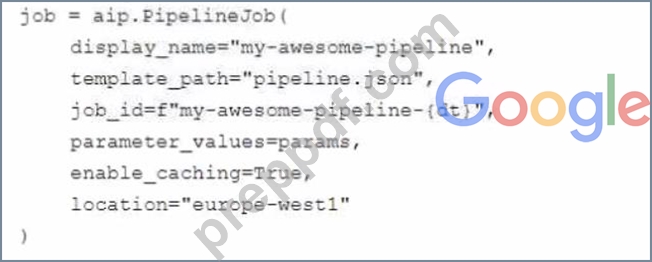
You perform many model iterations by adjusting the code and parameters of the training step. You observe high costs associated with the development, particularly the data export and preprocessing steps. You need to reduce model development costs. What should you do?
- A.

- B.

- C.

- D.

Answer: A
Explanation:
According to the official exam guide1, one of the skills assessed in the exam is to "automate and orchestrate ML pipelines using Cloud Composer". Vertex AI Pipelines2 is a service that allows you to orchestrate your ML workflows using Kubeflow Pipelines SDK v2 or TensorFlow Extended. Vertex AI Pipelines supports execution caching, which means that if you run a pipeline and it reaches a component that has already been run with the same inputs and parameters, the component does not run again. Instead, the component uses the output from the previous run. This can save you time and resources when you are iterating on your pipeline. Therefore, option A is the best way to reduce model development costs, as it enables execution caching for the data export and preprocessing steps, which are likely to be the same for each model iteration. The other options are not relevant or optimal for this scenario. Reference:
Professional ML Engineer Exam Guide
Vertex AI Pipelines
Google Professional Machine Learning Certification Exam 2023
Latest Google Professional Machine Learning Engineer Actual Free Exam Questions
NEW QUESTION # 190
......
For more info read reference:
Understanding functional and technical aspects of Professional Machine Learning Engineer - Google ML Solution Architecture
The following will be discussed in Google Professional-Machine-Learning-Engineer exam dumps:
- Monitoring
- Data connections
- Automation
- SDLC best practices
- Optimizing data use and storage
- Selection of quotas and compute/accelerators with components
- Serving
- Building secure ML systems
- Choose appropriate Google Cloud hardware components
- Choose appropriate Google Cloud software components
- Logging/management
- Design architecture that complies with regulatory and security concerns
- A variety of component types - data collection; data management
- Feature engineering
- Exploration/analysis
- Privacy implications of data usage
- Automation of data preparation and model training/deployment
Truly Beneficial For Your Google Exam: https://certkingdom.preppdf.com/Google/Professional-Machine-Learning-Engineer-prepaway-exam-dumps.html